12 min read
Kinoir: I Built a Private Movie and TV Tracker Just for Me

Here is a small test. Without opening any app, name the last five things you watched. Now name the episode you stopped on in the series you are halfway through. Finally, say whether you actually liked the last film you saw, and why.
Most of us do badly. Streaming services remember everything we watch, but they remember it for their own reasons: to keep us watching, not to help us remember. That memory belongs to them, it is scattered across a dozen apps, and it vanishes the moment a subscription lapses.
I built Kinoir to pass that test. It is a private movie and TV tracker made for exactly one person: me. This is the story of how it came together, screen by screen, and the decisions behind it, including the engineering bits for anyone who likes to look under the hood.
A personal project:
Kinoir is built for my own use and sits behind a single-owner login, so there is nothing to sign up for. I am sharing the story and the screenshots, not launching a product.Why I wanted a private movie and TV tracker#
There is no shortage of places to rate a film. Most of them are built around an audience: followers, public reviews, lists designed to be shown off. They are great at what they do, but they pull a record in a direction I did not want.
I wanted a place to be honest, not a place to perform.
So I wrote down what I actually needed:
- Remember what I watched, and when.
- Know exactly where I stopped in a series.
- Tell a first watch from a rewatch.
- Keep honest notes without writing for anyone else.
- Choose what to watch next from my own taste, not a trending list.
Kinoir is the answer to that list. It is a single-owner app: one login, one library, no followers and no public profile. I started building it in early September 2026, and it keeps growing with every release.
The home screen: a quiet lobby, not a feed#
When I open Kinoir, the first thing I see is a featured title the app calls Tonight's Signal, pulled from what is trending on TMDB (The Movie Database). Below it sits a Trending now rail that flips between Today and Week.
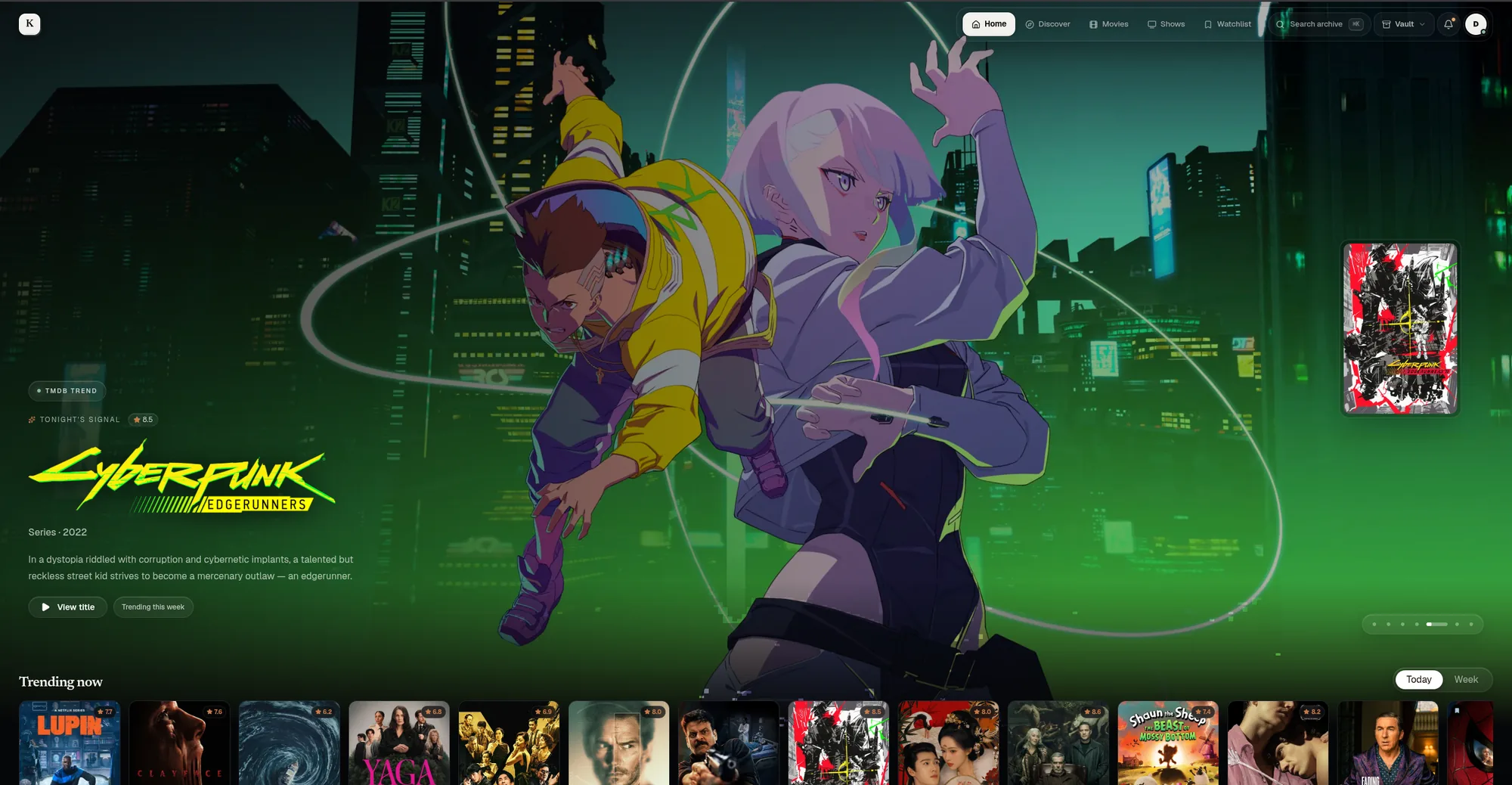
The look is deliberate. I wanted it to feel like a late-night cinema lobby rather than a spreadsheet: dark, poster-forward, with calm serif headlines. Across the top, a floating bar holds the whole map of the app: Home, Discover, Movies, Shows, Watchlist, a search box that opens with a keyboard shortcut, a notifications bell, and a Vault menu where my personal records live.
Every title gets a page, and one place to act on it#
Open any film or series and you land on a title page. The catalogue facts are all there: cast, runtime, language, release date, ratings from the usual review sites, even budget and box office for films. For shows, there is a season and episode view, and the page also tells me where the title is available to stream in Sri Lanka.
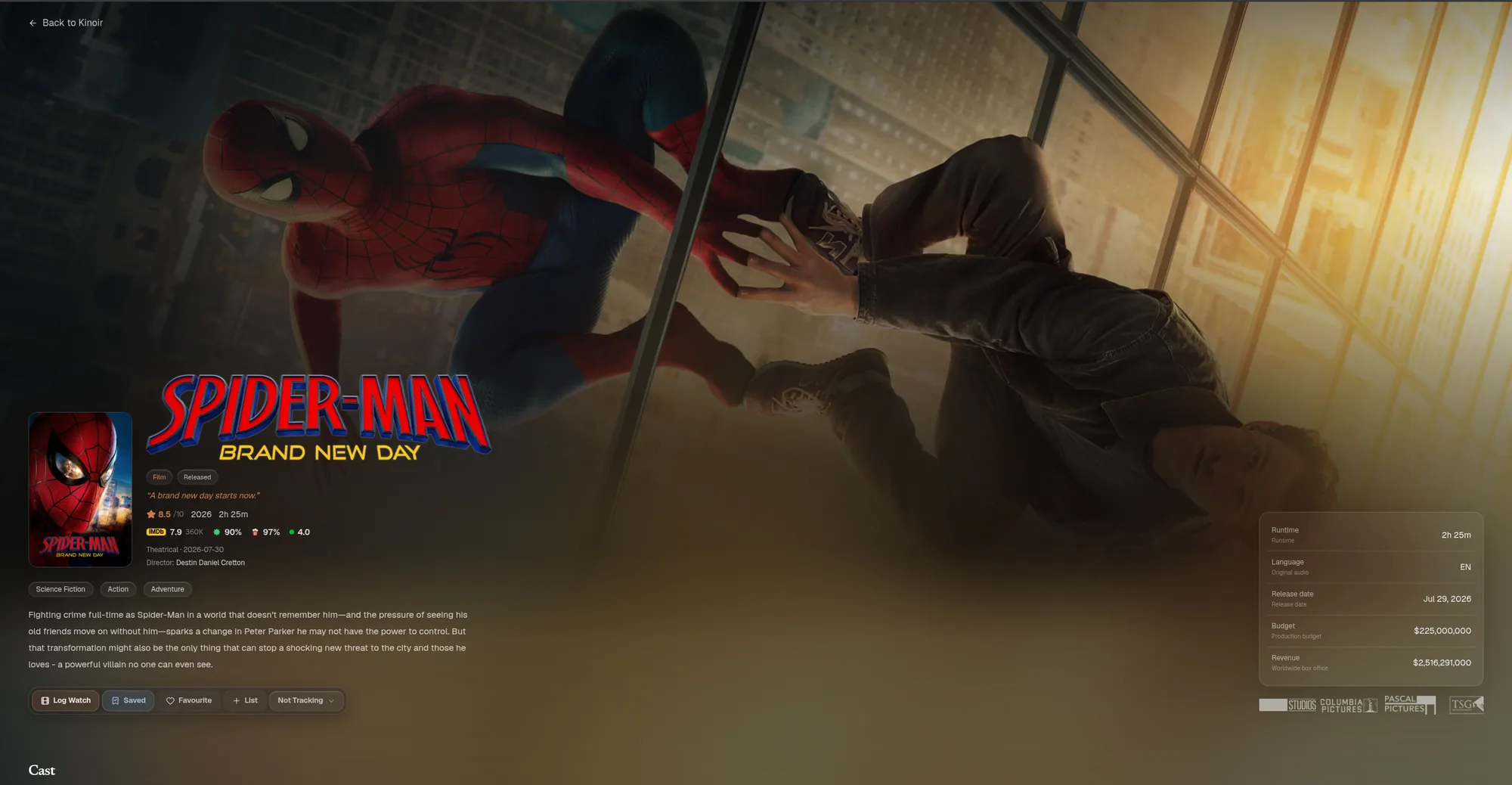
The row of buttons under the synopsis is the part that is mine. Log Watch records a viewing. Saved puts the title on my watchlist. Favourite and List do what they say, and a small tracking menu tells Kinoir whether to keep an eye on a series for new episodes.
Logging is intentionally lightweight. A journal that feels like paperwork is a journal you stop keeping, so every log is a couple of taps. Kinoir also only lets me log episodes that have actually been released, which sounds obvious until you build the feature without it.
The watchlist: a queue that does not nag#
Every watchlist has the same quiet problem: it only ever grows. Kinoir's version is called "The stories waiting for you," and it holds 86 saved titles at the moment, 58 films and 28 series.
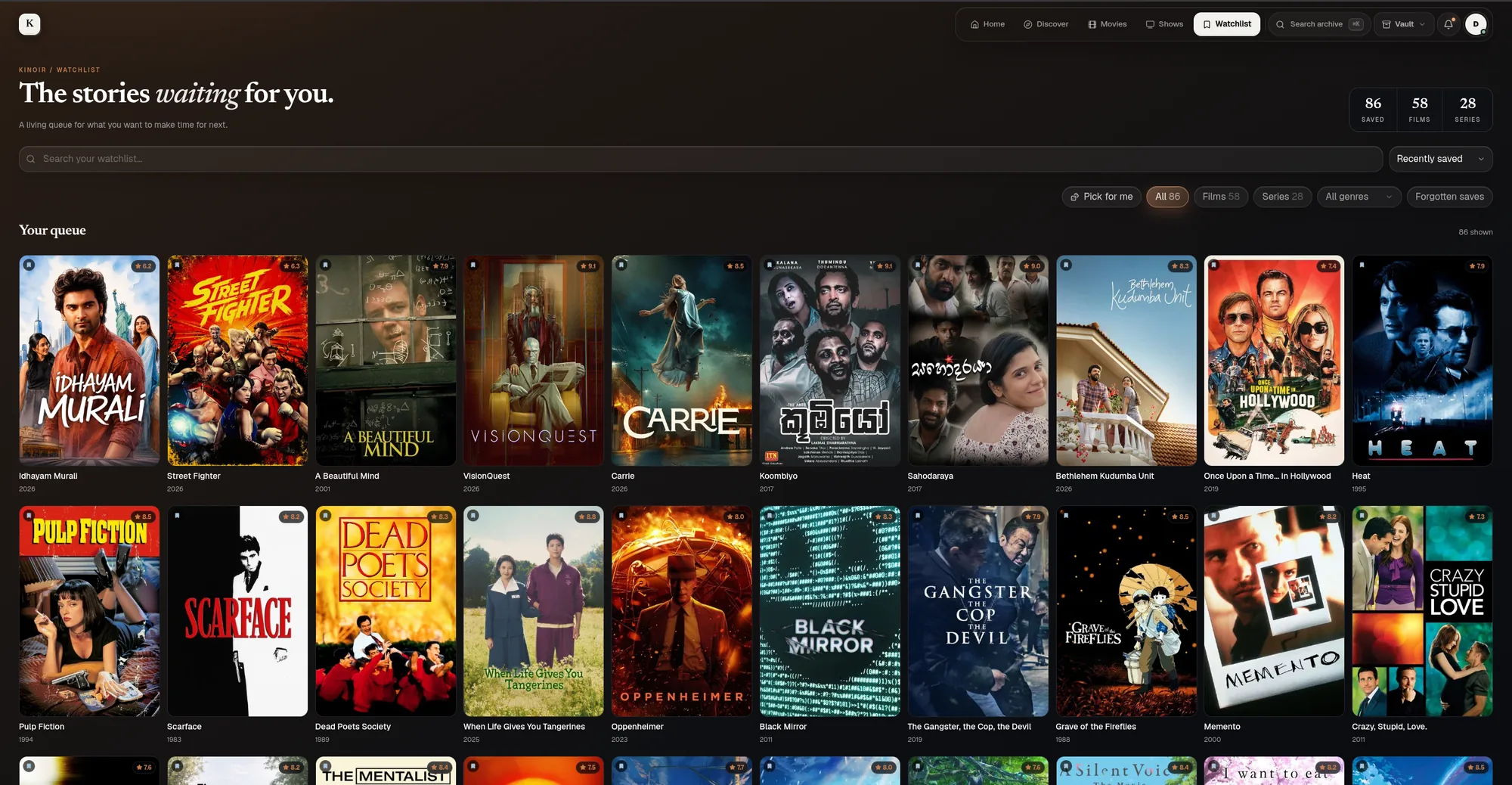
To keep that pile useful, I added a few small tools. I can filter by films, series, or genre, and search the queue by name. There is a Pick for me button for the nights when choosing takes longer than watching would. And a Forgotten saves filter brings back the titles that have been sitting there longest, so a film I was excited about last year does not quietly disappear.
The diary: a life in watching#
If the watchlist is what I intend to watch, the diary is what actually happened. The page opens with the line "A life in watching," and it reads exactly like that: every film and episode, bound chronologically as it happened, with ratings, notes and rewatches kept like ink on paper.
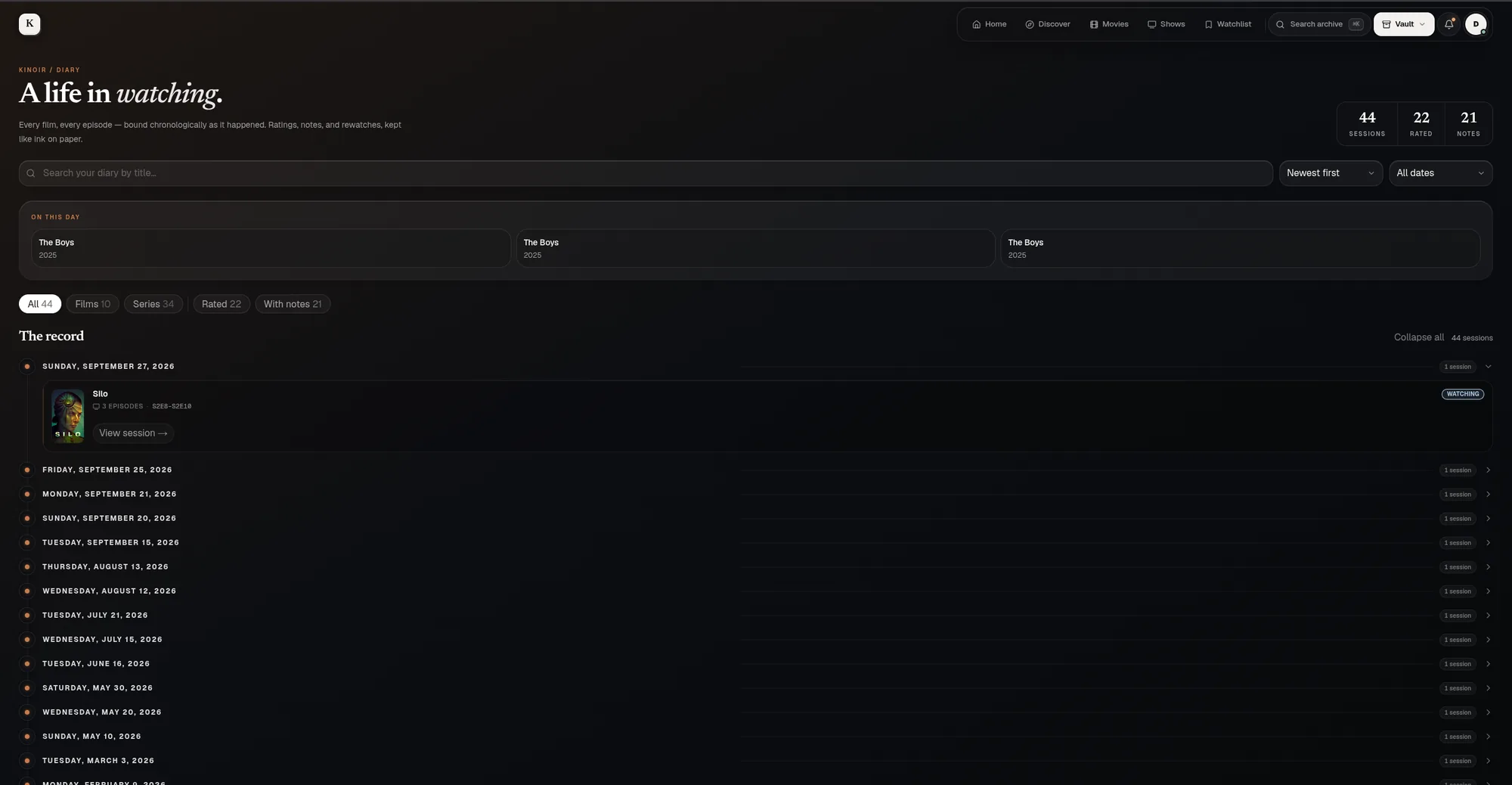
Two details make it feel alive. An On this day strip surfaces what I was watching on this date in earlier years, which is oddly moving once there is enough history. And entries are grouped into sessions, so an evening spent on three episodes of a series appears as one tidy entry instead of three separate lines.
Behind the scenes, this is where the data model earns its keep. A single watched or unwatched flag is not enough for television, so Kinoir treats movies, series, seasons and episodes as separate things. A rewatch is a new viewing event, not a correction to the past, so logging a film again keeps the original date. A rating stays at the level where I entered it: an episode rating never silently turns into a series rating.
The library: one living archive#
The watchlist asks what I want to watch. The diary asks what I watched and when. The library answers a third question: where does everything stand?
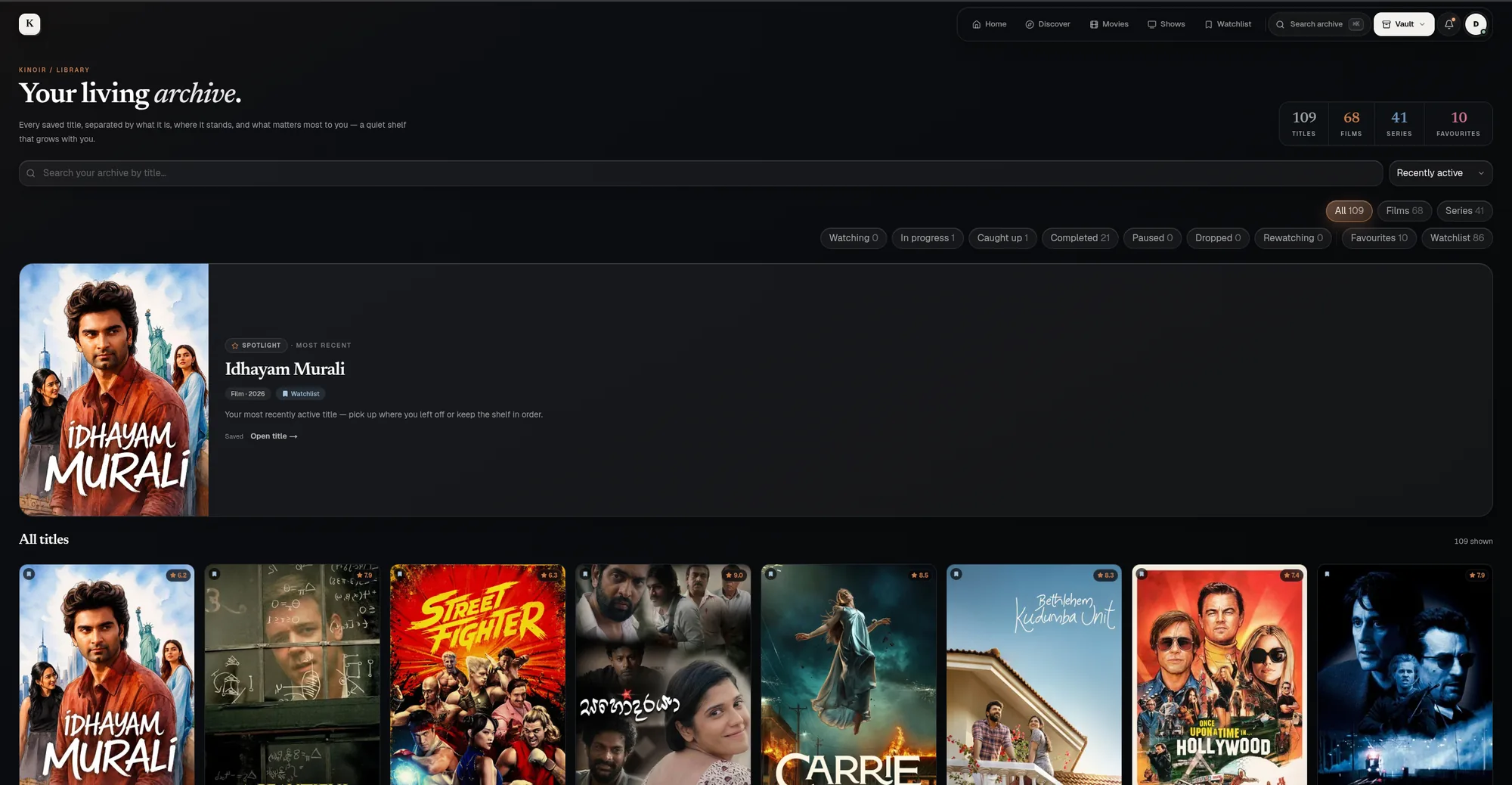
It calls itself "Your living archive," and it holds 109 titles across 68 films and 41 series, with 10 favourites. Each title carries a viewing state: watching, in progress, caught up, completed, paused, dropped or rewatching. One tap on a state filter shows me every series I have paused, or every show I abandoned and may want to give a second chance. A spotlight card at the top pulls forward my most recent title so I can pick up where I left off.
Statistics: your taste, in focus#
This is the page that makes a personal movie tracker feel worthwhile. After enough logging, Kinoir starts reading my own habits back to me, across a month, a year, or all time.
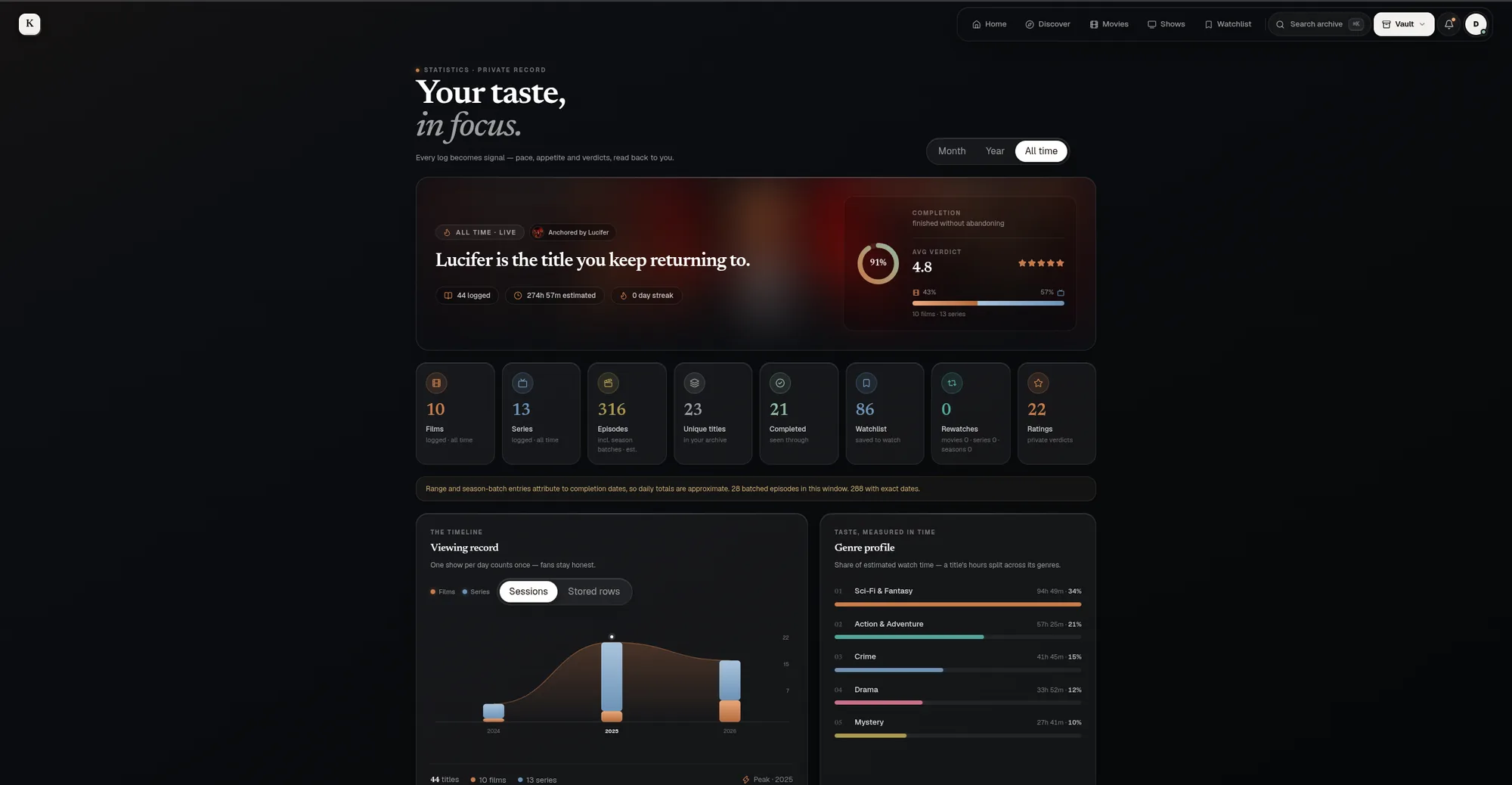
The headline is a sentence rather than a number. Right now it says that Lucifer is the title I keep returning to. Under it are the details: 44 titles logged, an estimated 274 hours of watching, a 91% completion rate for things I start, and an average verdict of 4.8 stars. A genre profile breaks down my taste by estimated watch time, where Sci-Fi and Fantasy leads with 34%.
Honest numbers:
Some entries are logged as a range or a whole season at once, so daily totals are approximate. Kinoir says so right on the page, because an approximate number that admits it is better than a precise one that is quietly wrong.There are no leaderboards, because there is nobody to compete with. The statistics exist to help me understand my own taste, not to score it.
Release alerts that only tell me what I care about#
A good TV show tracker is most useful when it speaks up at the right moment. Kinoir keeps an eye on series I follow and tells me when something changes.
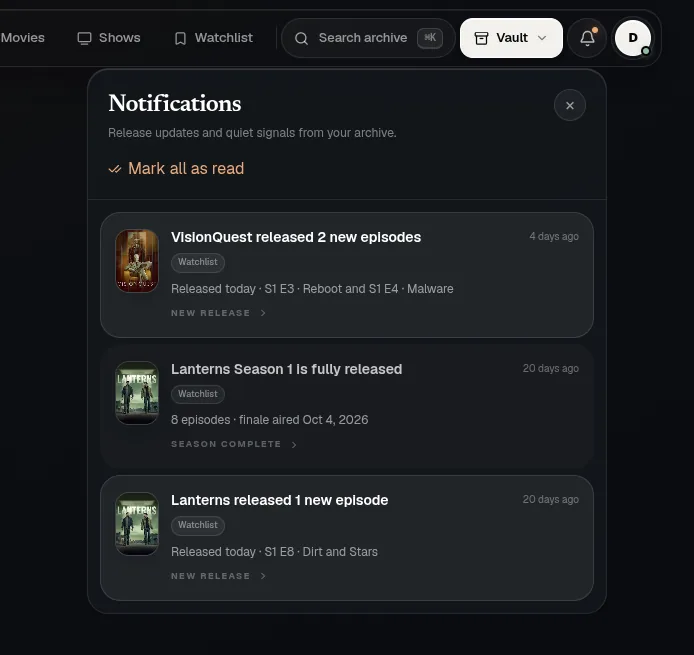
The inbox shows things like a series dropping two new episodes today, or a season finishing its run so I know it is safe to start. There is also a rolling 30-day release calendar, and the same alerts can arrive as Web Push notifications on my phone. Quiet hours suppress the buzz without losing the message, so nothing is missed, it just waits in the inbox. Kinoir also sends weekly, monthly and yearly report notifications that summarise what I watched.
Recommendations I can explain#
Recommendations are not the only reason to keep a journal, but they are one way its history pays off. A short cold-start questionnaire teaches Kinoir my baseline taste, and from there it works through five simple steps.
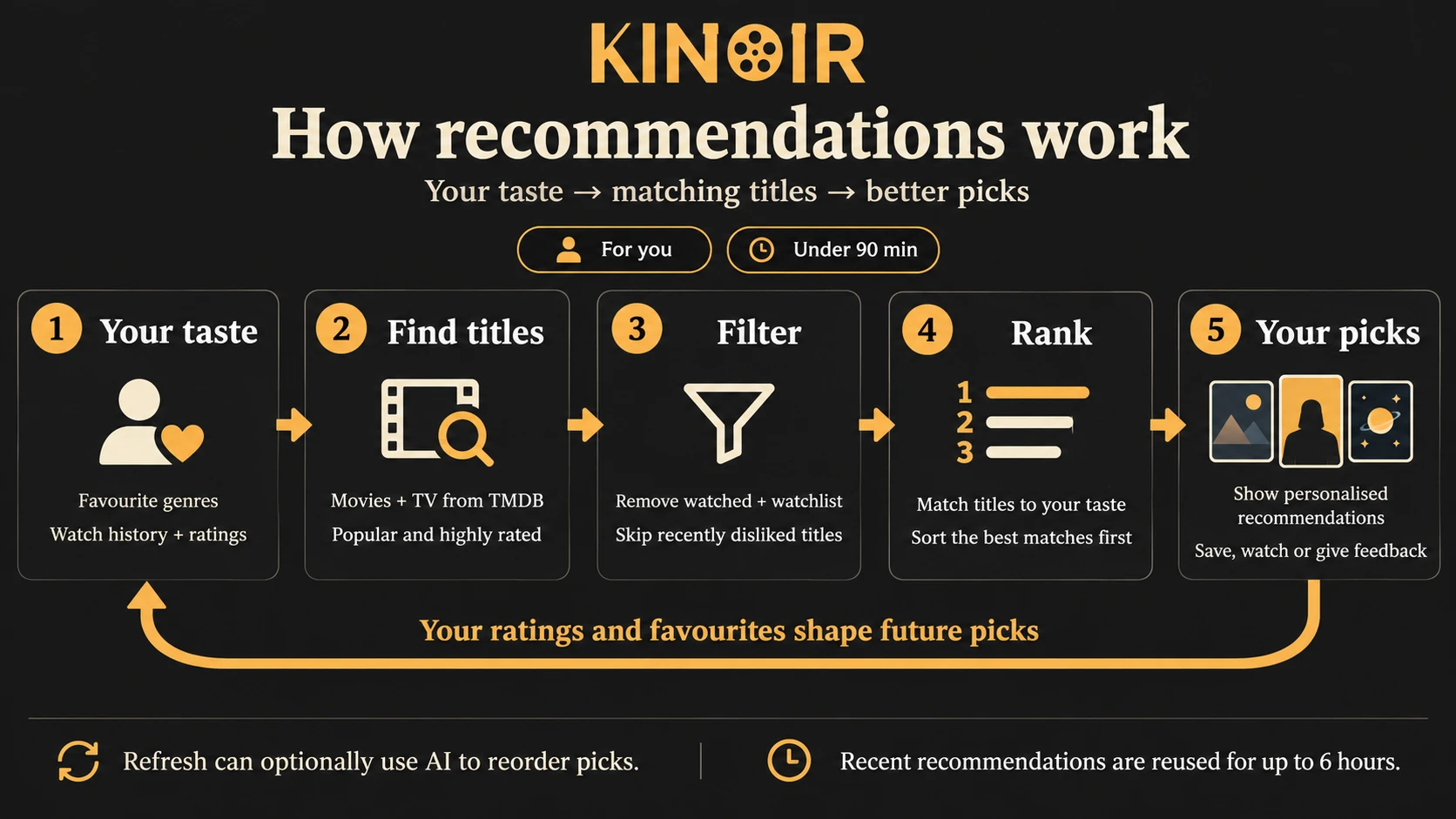
First it reads my favourite genres, watch history and ratings. Then it finds popular, highly rated movies and shows from TMDB, filters out anything I have already watched or saved and skips titles I recently disliked, and ranks what is left by how well it matches my taste. My ratings and favourites feed straight back into the next round. Modes such as Safe, Surprise and Short session change the mood of the picks.
The core is deterministic, so it works even when nothing else does. On top of that, an optional OpenCode Zen model can reorder the candidates when I refresh. The model is an extra ranking step, not the source of truth for my library.
Private by design:
My written reviews and notes are never sent to the model. The catalogue helps create candidates, while the journal stays my record.Under the hood: how Kinoir is built#
For the curious, the stack is modern but deliberately boring in the best way. It is designed for phones as much as desktops, because logging an episode should never require a laptop.
The full tech stack, for the curious
The most important decision was a boundary rather than a tool. TMDB owns catalogue facts. Kinoir owns personal memories: dates, ratings, notes, lists and viewing state. A catalogue refresh may update a poster or rename an episode, but it must never rewrite the day I watched something or the note I wrote about it. External facts can change; personal history should stay mine.
Keeping a private journal safe#
A journal is only worth keeping if it survives. Because Kinoir holds years of personal history, the unglamorous parts were part of the product from day one.
Everything sits behind an owner-only login, and the site ships with security headers that block framing, content sniffing and unnecessary browser permissions. Backups run automatically: each one is encrypted with AES-256-GCM, checked by decrypting and hashing it before upload, and stored in a separate private repository. A verification command can confirm any backup in isolation, and the restore command refuses to touch the live database. It only runs against a separate empty one, and only with an explicit confirmation flag. Boring, careful, and exactly what a personal archive deserves.
What building Kinoir taught me#
- Start from the record, not the screens. Once I knew what I wanted to remember, the pages almost designed themselves.
- Building for one person is a superpower. With no audience to please, I could say no to features and keep the product small and honest.
- A personal tool still deserves real engineering. Authentication, backups and safe offline sync matter just as much when the only user is you.
- Be honest about what the data can tell you. An approximate number that admits it is approximate beats a precise one that is wrong.
Kinoir is not trying to be a universal media platform. It is a focused answer to a personal problem: a reliable, private journal of what I watch, and a better way to return to it. If it helps me remember where I left off and why a suggestion fits, it is doing its job.
Want the technical summary? See the Kinoir project page for the stack and features, or browse more of my build stories.